
What is JPEG XL? The format explained, compared, and how to use it
JPEG XL is a modern image format that compresses far better than the original JPEG, adds a true lossless mode, transparency and HDR, and is completely royalty-free. On paper it is one of the best image formats ever standardised. In practice the catch is support: most browsers still cannot open a .jxl file. This guide explains what JPEG XL is, how much smaller it really is, how it stacks up against JPEG, WebP and AVIF, where it works today, and how to open a .jxl as JPG or PNG, or make one from a JPG, all in your browser, with nothing uploaded.
What is JPEG XL?
JPEG XL (file extension .jxl) is a modern image format created by the JPEG committee, the same group behind the original JPEG, and published as the international standard ISO/IEC 18181 in 2022. The 'XL' reflects its ambition: one format meant to cover web photos, lossless archival, professional editing, and even animation, as a long-term successor to the 1992-era JPEG.
Its headline is efficiency. At the same visual quality, JPEG XL is typically much smaller than JPEG, the project cites up to 55% smaller, and it adds features JPEG never had: a genuine lossless mode, transparency (an alpha channel), high dynamic range, wide colour, and up to 32 bits per channel. It is also royalty-free and open-source, built on the libjxl reference implementation under a permissive BSD licence, which removed the patent worries that slowed earlier formats.
One feature is unique to JPEG XL: it can take an existing JPEG and re-wrap it losslessly, shrinking it by around 20% while keeping the ability to reconstruct the exact original JPEG byte for byte. That makes it attractive for compacting huge legacy JPEG libraries with zero quality loss. The honest weakness is adoption, which the rest of this guide covers in detail.
See the difference: same file size, two formats
The clearest way to understand JPEG XL is to look. Below is the same photo encoded twice to roughly the same file size, once as JPEG, once as JPEG XL. Drag the handle to compare. Watch the smooth grey background and the skin: the JPEG shows blocky banding and noise, while the JPEG XL stays clean, despite being the same size or smaller.


The same source photo, both around 27 KB. Left: JPEG (note the blocking in the background gradient). Right: JPEG XL, slightly smaller yet visibly cleaner. Encoded with libjxl; the JPEG XL is shown decoded to a normal image because browsers can't display .jxl directly.
Colourful, gradient-heavy images are where JPEG struggles most. Here is an abstract test image at the same size in both formats. The JPEG breaks the smooth colour into blocks and noise; the JPEG XL keeps the gradients clean and the bubble edges sharp.
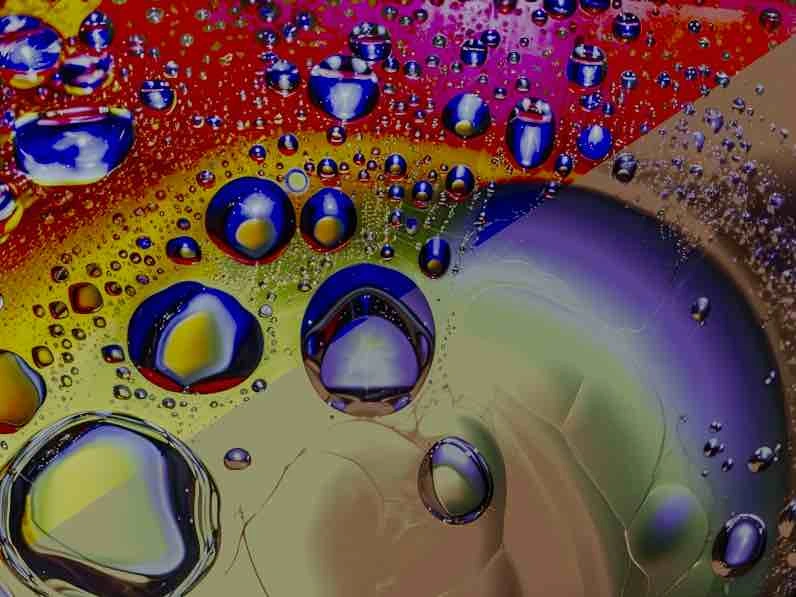
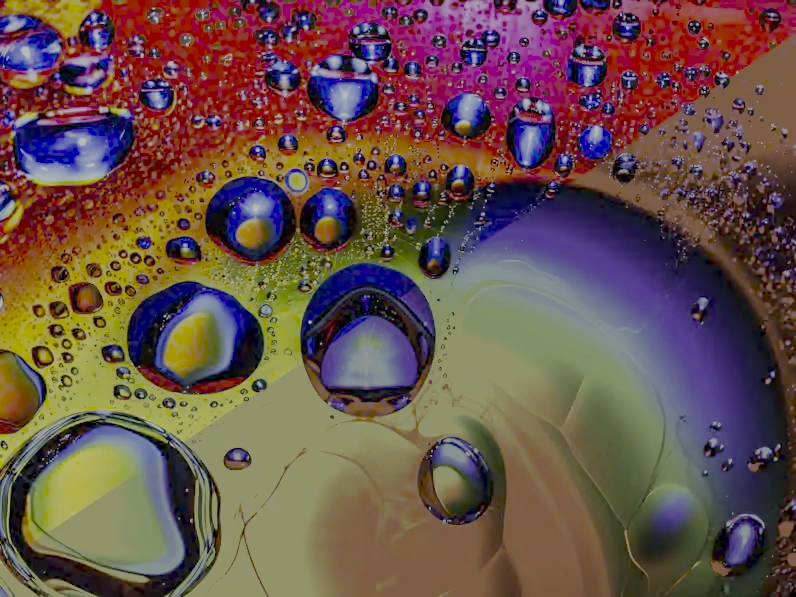
A colourful, gradient-rich image at the same file size. Left: JPEG. Right: JPEG XL, cleaner across the smooth colour. Test image courtesy of jpegxl.info; JPEG XL shown decoded because browsers can't display .jxl directly.
JPEG XL vs JPEG vs WebP vs AVIF
JPEG XL competes with three other formats: the universal old JPEG, the widely-supported WebP, and the efficient newer AVIF. Here is how they line up on the things that actually matter.
| Property | JPEG XL | JPEG | WebP | AVIF |
|---|---|---|---|---|
| Compression | Lossy and lossless | Lossy only | Lossy and lossless | Lossy and lossless |
| Size vs JPEG (same quality) | Up to ~55% smaller | Baseline | ~25–35% smaller | ~30–50% smaller |
| Transparency (alpha) | Yes | No | Yes | Yes |
| Animation | Yes | No | Yes | Yes |
| HDR / bit depth | Yes, up to 32-bit | 8-bit only | 8-bit | Yes, up to 12-bit |
| Progressive decoding | Yes (strong) | Yes (basic) | No | No |
| Lossless JPEG re-compression | Yes (~20%, reversible) | No | No | No |
| Browser support (2026) | Safari only; not Chrome/Firefox | Universal | All modern browsers | All major browsers |
| Royalty-free | Yes | Yes | Yes | Yes |
| Standardised | 2022 (ISO/IEC 18181) | 1992 | 2010 | 2019 |
How much smaller is JPEG XL, really?
JPEG XL's efficiency shows up differently in lossy and lossless modes, and it is worth separating the two because the wins are real but often overstated.
Lossy (photos for the web or sharing)
For ordinary photographs at the same visual quality, JPEG XL is up to around 55% smaller than JPEG, and the project's own figures put it roughly 25% smaller than AVIF in lossy mode. In independent testing the lossy gap between JPEG XL and AVIF is usually small and image-dependent. Both crush JPEG, and which wins varies by photo and bitrate. The honest summary: JPEG XL and AVIF are both enormous upgrades over JPEG, and close to each other.
Lossless (archival, graphics, masters)
Lossless is where JPEG XL clearly leads. Storing the same image with no quality loss, the equivalent PNG is roughly 46% larger, a lossless WebP about 15% larger, and a lossless AVIF around 63% larger than the JPEG XL. If you keep lossless masters or transparent graphics, JPEG XL is the most space-efficient option available.
Re-compressing existing JPEGs
JPEG XL can losslessly re-pack an existing JPEG, cutting roughly 20% off the file while keeping the ability to reconstruct the exact original. For an archive of millions of legacy JPEGs that 20% is significant, and unlike a normal re-encode it throws nothing away. (This specific mode needs the libjxl command-line tool; the browser converters here do a standard pixel re-encode instead.)
Browser and software support in 2026
This is the deciding factor, so here is the current state plainly. The short version: Apple supports JPEG XL, the big two browsers do not, and desktop creative software is well ahead of browsers.
| Software | JPEG XL support |
|---|---|
| Safari (macOS / iOS) | Yes, since Safari 17 (macOS Sonoma, iOS 17). Animation not supported |
| Chrome / Edge / Brave | No by default, Chrome added it behind a flag, then removed support in 2023 |
| Firefox | Behind a flag in Nightly only (image.jxl.enabled); off in the release version |
| Other browsers | On by default in Thorium, Waterfox, Pale Moon, Orion, Ladybird and others |
| Apple Preview / Finder | Yes on macOS Sonoma and later |
| Adobe Photoshop / Lightroom / Camera Raw | Yes (native or via official plugin) |
| Affinity, GIMP, Krita, Paint.NET | Yes |
| Windows 11 | Recent builds add support; older Windows needs a codec add-on |
| ImageMagick, FFmpeg, GDAL, libjxl | Yes |
Because Chrome and Firefox are the most-used browsers, a .jxl posted on the open web simply will not display for most visitors today, which is why this format has not taken over despite being technically excellent. If you must serve JPEG XL on the web, you would need a fallback for non-Safari browsers, the same way AVIF is served with a JPEG fallback.
How to enable JPEG XL in Chrome or Firefox
You mostly cannot, and that is the point. Chrome removed the `chrome://flags/#enable-jxl-image-format` flag when it dropped support, so current stable Chrome has no switch to turn it on. Firefox exposes `image.jxl.enabled` only in Nightly builds. For everyday use, do not rely on a browser flag, if you need to view a .jxl, open it in Safari, in an editor like Photoshop or GIMP, or just convert it to a JPG or PNG.
JPEG XL vs AVIF: which should you use?
This is the comparison people ask about most, because both are modern, efficient, royalty-free formats that arrived around the same time. They are genuinely close, and the right choice depends on what you are doing.
- For images on the open web today, AVIF wins, not because it compresses better (they are comparable), but because every major browser decodes AVIF and only Safari decodes JPEG XL. AVIF with a JPEG fallback reaches everyone; JPEG XL does not.
- For lossless and archival, JPEG XL wins. It is meaningfully smaller than lossless AVIF, decodes faster, and offers progressive loading and the reversible JPEG re-compression that AVIF has no answer to.
- For high bit depth and professional editing, JPEG XL leads, with up to 32-bit, strong progressive decoding, and broad support across Photoshop, Lightroom, Affinity and Krita.
- For animation or HDR on the web, AVIF is the safer pick today purely because it is decodable in more places.
In one line: use AVIF (or WebP) for anything that goes on a website now, and reach for JPEG XL when you control the software, value lossless efficiency, or are building a long-term archive. If you are weighing all four formats, the companion guide on JPG vs PNG vs WebP vs AVIF covers the broader decision.
Should you use JPEG XL yet?
JPEG XL is a better format than almost everything it competes with, and also the hardest to actually use, because the two most popular browsers refuse to decode it. That tension produces a simple set of rules.
- Use it now for personal or team archives where your software reads it, for Apple-only audiences on Safari 17+, and for professional photo workflows in Lightroom, Affinity or Krita.
- Wait before serving JPEG XL on a public website. Without Chrome and Firefox support it cannot be your only format, and AVIF or WebP get you most of the efficiency with none of the compatibility risk.
- Never send a .jxl to someone on ordinary software, or to an upload form, expecting it to open. Convert it to JPG or PNG first.
- Always keep your originals. JPEG XL is young; holding the source JPG or PNG means you can regenerate whatever format you need later.
How to open or convert JPEG XL files
Every tool below runs in your browser using a WebAssembly build of libjxl, so JPEG XL is decoded or encoded locally and nothing is uploaded, which is also why these work even though Chrome and Firefox cannot display .jxl themselves.
- Can't open a .jxl? Convert it to a universal JPEG XL to JPG for any app or form, or to JPEG XL to PNG when you need to keep transparency or stay lossless.
- Want to make JPEG XL files? Encode a JPG to JPEG XL for a smaller, future-proof copy, or a PNG to JPEG XL to keep transparency at a fraction of PNG's size. Just remember most browsers can't open the result yet.
- Need it under a size limit after converting? Run the JPG through compress to a target KB.
- Not sure JPEG XL is the right format at all? Compare your options in the image format guide, or just convert to WebP or AVIF for the web instead.
Frequently asked questions
Related guides
- Convert HEIC to JPG
Why iPhone photos are HEIC, where the format breaks, and how to convert to JPG for any form, PC or email.
- JPG vs PNG vs WebP
Compression, transparency, support and file size compared, with exactly when to use JPG, PNG, WebP or AVIF.
- Photos to PDF
Combine images into one clean PDF for uploads: page order, page size, and keeping the file small.